

















Microsoft Endpoint Manager - Manage iOS and iPadOS updates with Intune
abril 13, 2021 / Unisys Corporation
This blog post reviews the update policies for iOS in Microsoft Endpoint Manager, also known as Intune. Among all of the leading unified endpoint management (UEM) solutions, Intune is the only one with the following capabilities.
Although Apple recommends that consumers always update their iOS device to the latest version for compatibility and security reasons, this expectation does not easily transfer to enterprise devices. It's not always easy for beginners to navigate the Intune console. In addition, the update function is very different from the device profile and can be easily missed.
To create the update profile of your iOS devices, navigate to the menu Devices>iOS/iPadOS. From the iOS/iPadOS Policies section, select Update policies for iOS/iPadOS and create your profile.
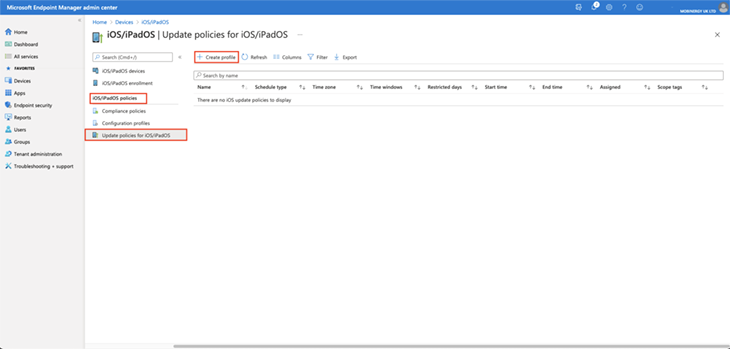
Now let's see what we have inside the profile. You will arrive at the following stage.
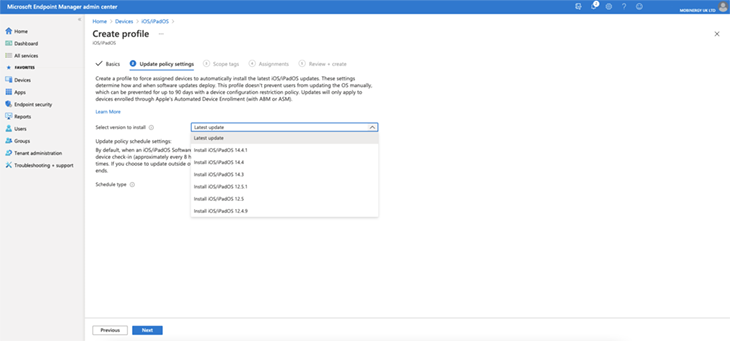
Microsoft offers an interesting integration with Intune that makes it possible to select the iOS version for your devices. But you must be careful because this does not prevent the user from retrieving the latest version released by Apple.
It will also be mandatory to add a restriction profile that will delay the installation option by 90 days for this purpose. And, of course, your device must be managed with Automated Device Enrollment (ADE), formerly Device Enrollment Program (DEP). To summarize, iOS devices must be supervised.
Microsoft then provides the capability to schedule the update with three options:
- Update at next check-in: The update installs on the device the next time it checks in with Intune. This is the simplest option and has no additional configurations.
- Update during scheduled time: With this option, you can configure one or more time windows during which the update will be available for automatic installation upon check-in. By default, the check-in occurs approximately every eight hours. At the time of writing, there is no possibility of changing this default setting.
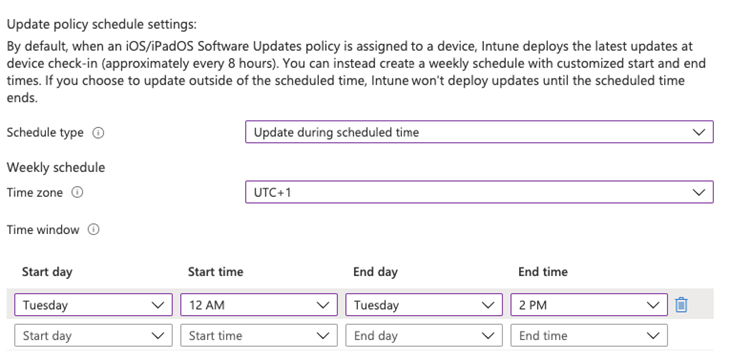
Important: If your company is present in many countries, you must create several update policies with the correct time zones assigned to the corresponding devices
- Update outside of scheduled time: This option is the opposite of the previous one. You can configure one or more windows during which the updates won't install at all upon check-in. With most traditional tools, it is possible to define a range of operations for which no action is taken on the devices.
This integration is very effective for managing updates on iOS devices. In contrast, most solutions only offer deferred installation. In some industries, such as air travel, having control of the iOS version is often a requirement.
Before this capability, one had to set up a proxy PAC system to block the iOS update URL directly through Apple. It did the job quite well but was complicated to maintain. Now, Microsoft offers more flexibility and ease.
Learn more about how Unisys can help you manage and secure all enterprise devices with Modern Device Management