

















9 Simple Ways to Secure Your Work-from-Home Office
Dezember 7, 2021 / Unisys Corporation
Despite best intentions, most people working from home overlook key steps to protect sensitive data, leaving their personal information, and their employers, at risk.
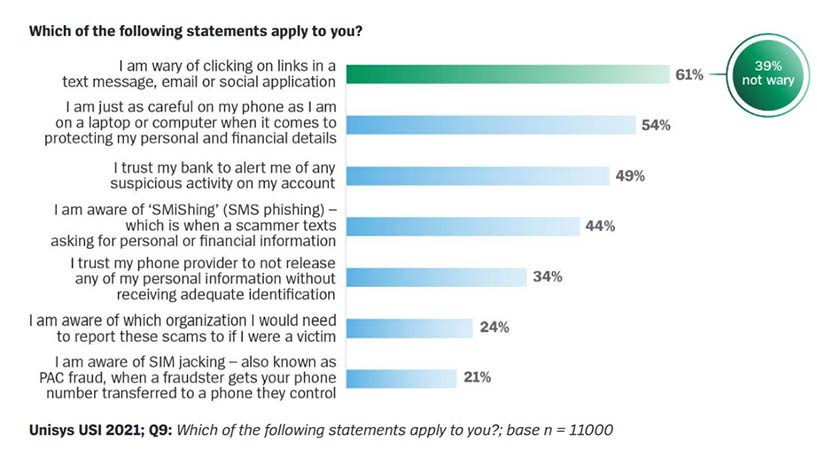
The latest Unisys Security Index™ found that while 62% of consumers across Australia, Brazil, Columbia, Germany, Mexico, the Netherland and the U.S. say they are personally responsible for keeping their own data safe and secure while working from home, many are not even aware of the common cybersecurity risks. For example, two in five people aren’t wary of clicking on links in messages; almost half are less careful protecting the information on their phone than their computer, and 56% don’t know what phishing is. Read the report for more details.
COVID pushed us to be constantly online: to work from home, shop, play games and watch Netflix. Unfortunately, cybercriminals have used this to their advantage in two key ways:
- Most people’s home Wi-Fi is not as secure as when they are in the office, offering a pathway to access your personal information or your employer’s network
- Attackers use COVID-related issues and trends, such as tracking a courier delivery, to disguise phishing attacks that trick people into clicking on links or revealing personal information.
The good news is that some simple steps will make it that much harder for the bad guys to access your work from home environment – reducing the risks to you and your employer.
Here are nine tips for working from home securely:
- Use a separate Wi-Fi hot spot to access work systems when working from home. Separate the network you use to access work systems from the one the rest of our household uses (e.g., for playing games or remote schooling). If multiple people work from home, consider each having their own Wi-Fi hotspot for work.
- Segregate the Wi-Fi you use to connect your smart devices (e.g., digital assistant, baby or pet monitor, smart TV, video doorbell, or temperature controls). Use the guest Wi-Fi option on your router for your IoT devices (ask your telco provider how to set it up). This prevents those devices and apps from being used to access your computer or connection to your employer’s systems.
- Always lock your work device when you walk away from it. You might love and trust your family or housemates, but don’t provide the opportunity for them to accidentally click on a malicious link or webpage when accessing their social media on your laptop or phone.
- Be aware of who or what can hear your confidential conversations. Even if you are working on a separate Wi-Fi network, could a nearby smart speaker or digital assistant accidentally be activated by your voice? Or can other people in your home hear your conversation? Especially as we tend to speak louder when wearing headphones. Find a quiet room for confidential conversations.
- Be careful of what is in view if you take screen grabs or photos about your “cool” home office and video conference meetings, especially if you plan to post them on social media.
- When sharing docs in online meetings, only share the specific doc or app – not your whole desktop, so that you don’t accidentally broadcast other confidential material or messages.
- Hide your Wi-Fi password from prying eyes – don’t stick it on the fridge or tape it to the modem where visitors and neighbors can easily find it.
- Choose passwords that are hard to guess – and secure them even further by using a password management tool. That way, your passwords are encrypted in a secure app, so you don’t need to write them on post-it notes. For the passwords, use a mix of uppercase and lowercase, numbers and special characters. A good idea is to choose a phrase you will remember and swap some letters for numbers or special characters. For mobile devices, secure the device and key applications such as online banking or payments with your fingerprint or face scan.
- Look out for Phishing and SMiShing scams – when an email or text message pretends to be from someone you trust to trick you into clicking on a link or providing personal details. Don’t reply or click on the link if the message is from someone you don’t know, or the language seems out of character or has a suspicious sense of urgency. If it is from someone you know, contact them via another channel to verify if the message is legitimate – you might be the one to alert them they have been hacked. Common scams pretend to be from the tax office, courier companies or your email provider.