
















How to improve conditional access with Workspace ONE Access
février 20, 2023 / Unisys Corporation
The concept of Zero Trust
The concept of Zero Trust is gaining popularity, especially in the realm of conditional access. It is a crucial aspect of cybersecurity, but what does it entail?
To understand Zero Trust, we must understand the past. All directories, applications and data were previously housed within a company or building. Protecting these assets meant defending against external attacks by implementing firewalls and secure access measures. If a domain user stayed within these boundaries, they were generally deemed trustworthy.
However, as businesses began collaborating with other companies and utilizing cloud-based platforms and services, it became clear that trusting users based solely on their login credentials was no longer sufficient. This is where Zero Trust comes into play.
Zero Trust means relying on user authentication alone, even with a second factor, is no longer enough. Other factors, such as device compliance and network source, must also be considered to determine if a user can access enterprise resources and data. This information can be combined with various login methods to create a comprehensive picture of the user's legitimacy.
It's important to note that there isn't a single product enabling Zero Trust. It's a collection of concepts that work together to form a complete solution. This article will focus on one aspect of the Zero Trust concept - authentication and authorization for resource access and usage.
Workspace ONE access
The Workspace ONE suite relies on a central tool called Workspace ONE Access, which serves as the authentication hub for the entire Workspace ONE suite. This tool can also be referred to as an authentication broker.
With Workspace ONE Access, it is possible to bring together multiple Identity Provider (IdP) sources, such as Okta, Azure Active Directory, Ping Identity, Active Directory Federation Services (ADFS) and Active Directory for centralized login. This allows for a vast range of authentication methods, ensuring maximum flexibility for granting authorization to specific resources.
Possible scenario
One possible scenario for using Workspace ONE Access involves leveraging it as an IdP for enterprise applications. This approach allows for a variety of login methods to be used, including Workspace ONE UEM device compliance.
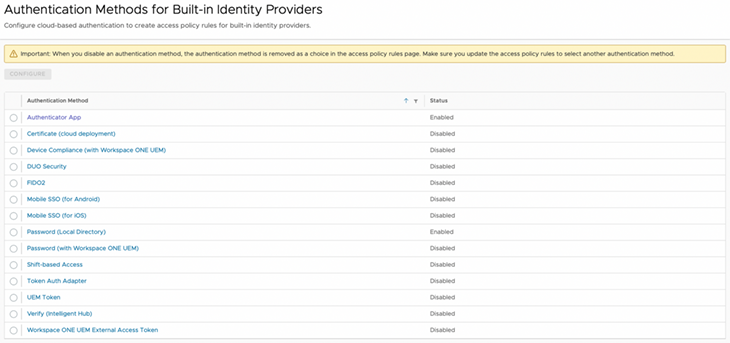
To implement this scenario, policies can be established that permit – or deny – login for specific user groups who use certain combinations and sequences of authentication methods from known or unknown source networks and client applications.
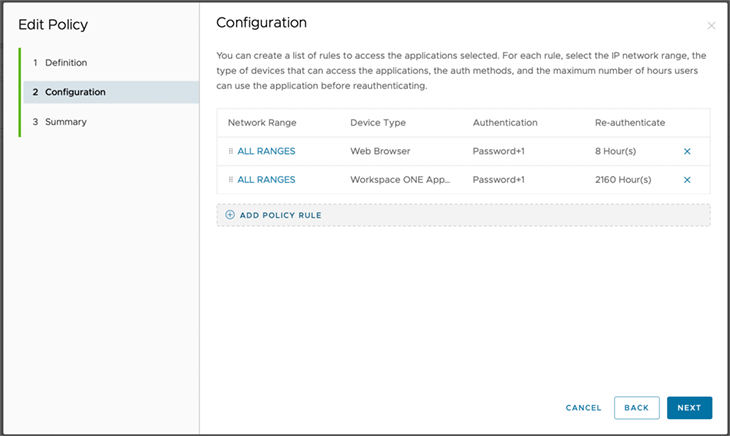
These policies can be configured like a firewall, whereby the first matching rule is applied. Each rule can be structured as follows:
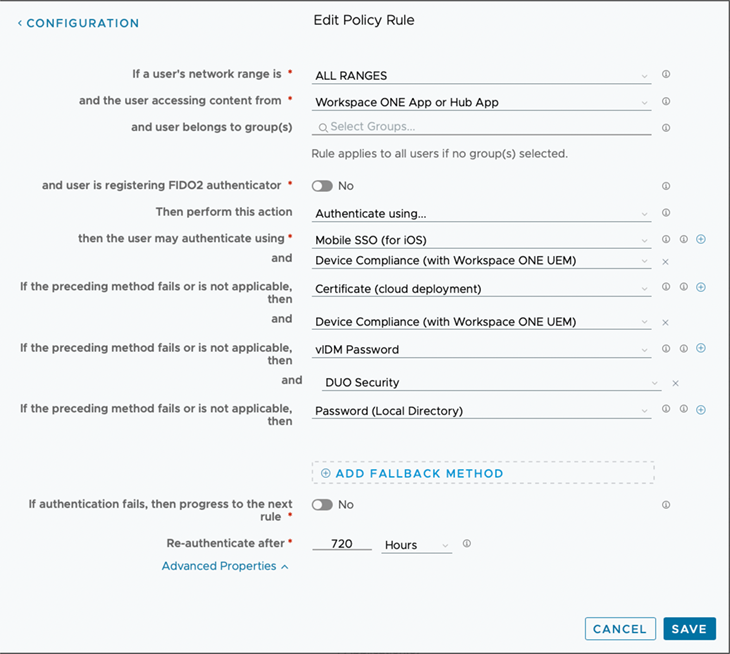
In this case, a rule specifies that the Workspace ONE App or Intelligent Hub must use a particular set of authentication methods combined with device compliance from Workspace ONE UEM to log in, regardless of whether the attempt is coming from an internal or external source.
The benefits of this approach include:
- An arbitrary combination of login methods
- The option to configure specific policies for each application if needed
- The ability to establish fallback methods in case a user does not have their smart card at hand
- Extensive compliance rules from Workspace ONE UEM
Microsoft Office example
If a user is opening Teams within the Office domain, which is more easily integrated with Workspace ONE Access than with an external IdP, the appropriate policy rule for the browser (the Teams user agent in this case) is applied.
This rule can be restricted to a user group, such as those with a specific UEM-installed certificate and compliant device status. In this case, authentication is performed automatically without requiring further action from the user.
However, a fallback combination of methods can be applied if the device lacks the required certificate. This approach maximizes capabilities while also significantly increasing overall security.
Learn more about how Unisys can help you manage and secure all enterprise devices with Modern Device Management.